Configuration
Once the package is deployed and the app is approved, GriMoire still needs runtime configuration in the web part property pane.
The current property pane exposes these fields:
Proxy URLProxy API KeyBackend API ResourceBackend ModelEnvironment ID
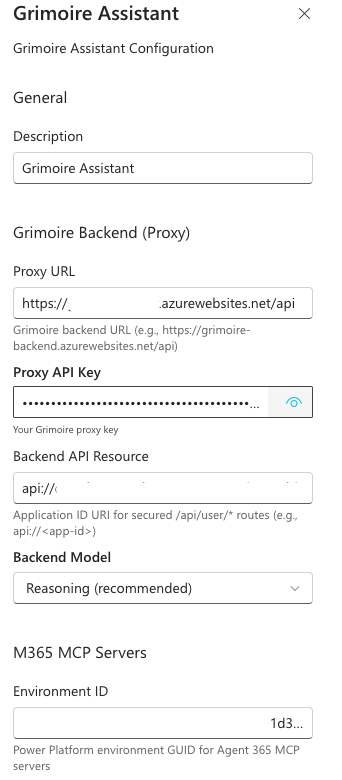
Setting-by-setting guide
Proxy URL
The base backend API URL used by the web part to reach the Azure Functions proxy.
The backend deployment script prints it in the final summary:
Proxy URL: https://<function-app>.azurewebsites.net/api
Proxy API Key
The shared key the web part sends to the backend to authenticate requests.
The backend deployment script prints it in the final summary as Proxy API Key.
Backend API Resource
The Application ID URI for the Entra app registration that protects the backend's user data routes (/api/user/notes and /api/user/preferences) via Easy Auth.
The backend deployment script prints it in the final summary as Backend API URI. The format is api://<app-id>.
Backend Model
The route selection used for text completions from the web part. The current options are:
Reasoning (recommended)Fast (lightweight)
Both models are deployed by the deploy script. Reasoning is the primary model for chat and tool dispatch. The fast model is also used internally for intent classification, query expansion, sentiment analysis, and context compression — regardless of which backend model is selected here.
Environment ID
The Agent 365 MCP servers are hosted behind a gateway scoped to a Power Platform environment. The Environment ID is the GUID used to construct the server URLs. Every Microsoft 365 tenant has a default Power Platform environment.
See Find your environment and organization IDs in the Microsoft documentation.
Recommended baseline
For a stable first run, use:
Proxy URL: the exact/apiURL printed by backend deploymentProxy API Key: the exact key printed by backend deploymentBackend API Resource: theapi://<app-id>URI printed by backend deploymentBackend Model:Reasoning (recommended)Environment ID: the default Power Platform environment GUID
Quick diagnostic checklist
If GriMoire loads but feels partially broken, check these in order:
- Does the backend health URL respond?
- Is the
Proxy URLusing the/apiform? - Was the
Proxy API Keycopied correctly? - Is
Backend API Resourceset to theapi://<app-id>URI from deployment? - Is
Backend Modelset toReasoning? - Is
Environment IDa GUID, not a URL or name? - Were the SharePoint API access requests approved?